I have a broad client base (mostly a broad set of colleagues and other co-conspirators. So when someone asked me to create a modified ROM of the Atari 2600 version of Frogger to be ran during a performance piece on real hardware, I said, “yes, please”.
My first Anglefire website was a vaguely legal collection of ROMs and Warez (ifykyk). I understand the basics of emulation and figured it was technically possible. I just didn’t know quite where to start.
Research
- Racing the Beam provided the background I really needed to understand the 6502 that powers the Atari 2600.
- AtariAge is an active online community where folks trade knowledge about the platform and market their homebrew carts
- Changing Atari VCS Graphics- The Easy Way is out of date, but helped tremendously with the task at hand.
Tools
- DASM, a macro assembler that works like a compiler for my purposes.
- Distella, a disassembler that “decompiles” original ROMs for the Atari 2600/7800
- Stella is an incredible Emulator with a built in debugger
- SprEd A pixel/sprite editor that exports to a number of different formats makes designing new graphics a lot less tedious.
Enter H-o-m-ee-r
The client wanted to change the original 1982 Frogger for the Atari 2600. We decided on swapping out some graphics so the message H-O-M-E played across the screen- and a way to start a basic demo ands free.
The original ROM is easy to find, but the original source code is likely lost to time. The original code though is likely not too different from the disassembled dump that Distella produced.
## let's disassemble, assemble again, and make sure we can still play the game.

 $ distella -paf ./Frogger.bin > ./Frogger.asm
 $ dasm Frogger.asm -f3 -oFrogger.bin
 $ stella ./Frogger.bin
Opening the ASM file is a little daunting at first. Luckily I wasn’t planning on changing any logic in the game, so we’ll ignore those stanzas of code and focus on the sprites. By identifying the sections of data loading code, I was able to isolate the graphics.
; https://gist.github.com/erik-nilcoast/cc55644c916c729e6a82ae07b681ac2b#file-frogger-asm-L2299-L2332
;
.byte $82 ; |X     X | Here's our frog. I know he doesn't look like much.
.byte $92 ; |X  X  X |
.byte $FE ; |XXXXXXX |
.byte $38 ; |  XXX   |
.byte $7C ; | XXXXX  |
.byte $BA ; |X XXX X |
.byte $92 ; |X  X  X |
By passing a cfg file, I was able to instruct the disassembler to draw an ASCII representation of of the bits that make up each byte. You pass the start and end address for the instructions you want to treat as graphics.
# frogger.cfg
GFX F1F5 F212
GFX FCFD FFF9
Now we can combine all of our tools to hand edit the graphics in the assembly file. Using the SprEd editor I was able to design new graphics for each one of the sprites. Editing the ASM file is incredibly delicate. I recommend finding a good workflow and doing a few tests. If like me, you can’t “see” most of the graphics via the ASCII representation. I started with changing one byte every 8 instructions to $FF (11111111 in binary). This allowed me to identify most of the graphics in the game.
End Result
After a lot of trial and error, we got the result we were looking for:
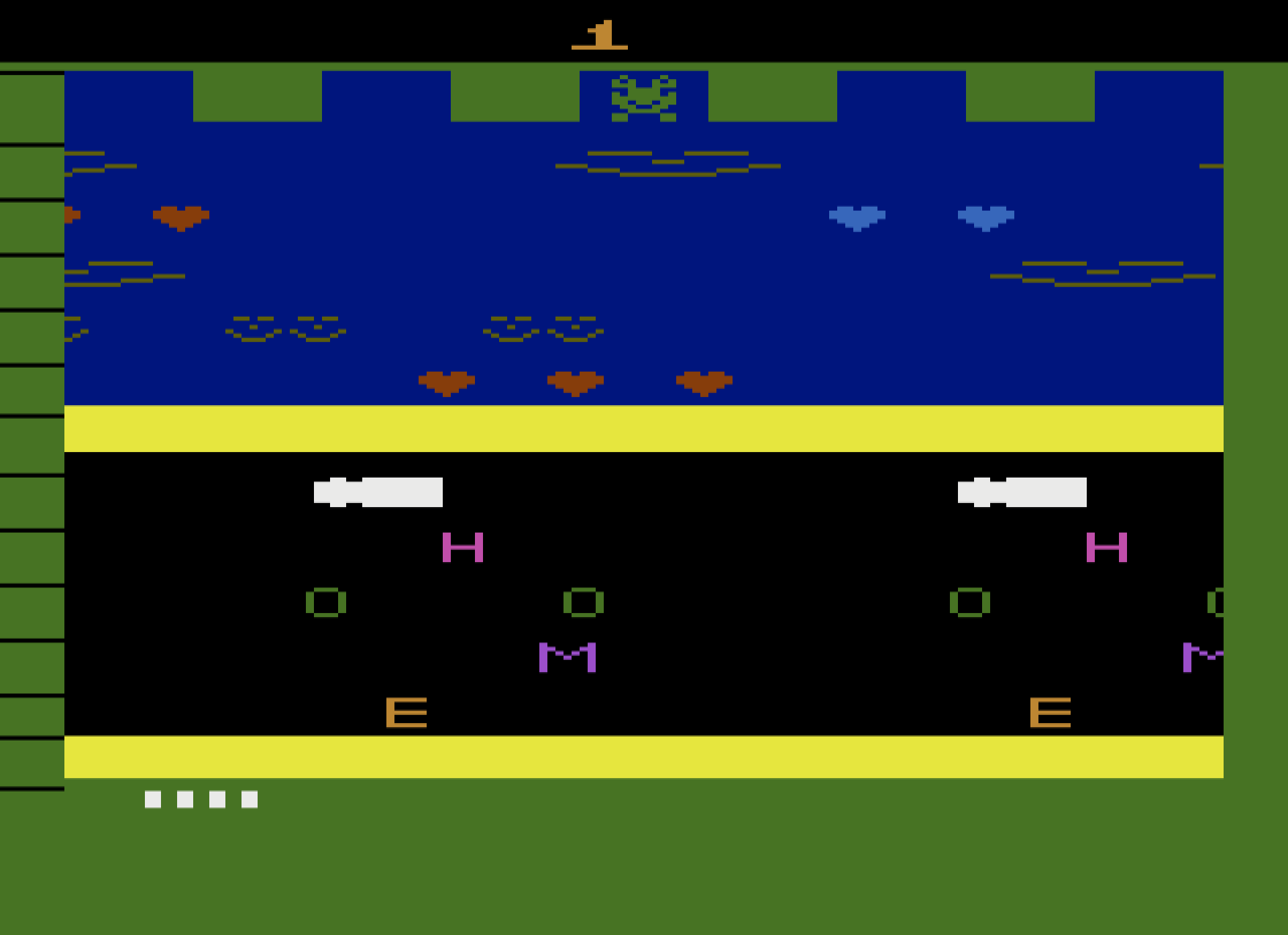
The game is still completely playable and after mucking with a bunch of different hardware options, we were able to get the result loaded onto an original Atari 2600.
Note: All of this work was done by hand with a human brain.